
The device and platform
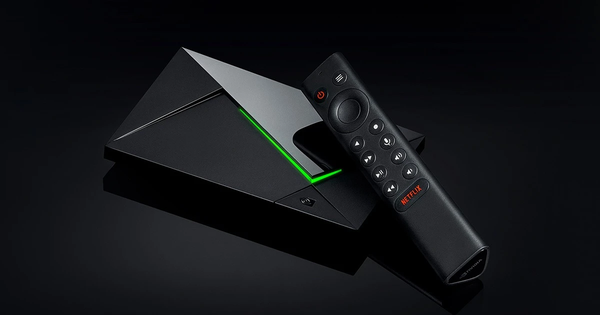
Confirm that it is the Pro
NVIDIA’s SHIELD TV Pro specification lists Android TV, 3 GB RAM and 16 GB storage, with some storage occupied by system software. Its connections include Gigabit Ethernet and two Type-A USB 3.0 ports. This is the Pro specification. Do not apply its port count, storage arrangement or product photograph to another SHIELD model.
The exact installed software can differ from a product page’s baseline after updates. Record the current device information alongside the model. A product-family name alone is too broad when discussing a port, an accessory or a software requirement.
Choose a connection for a clear reason
The Pro’s documented Ethernet connection supplies a wired option for the local network. It can be useful when comparing a wireless problem, but the connector’s rated capability is not a measurement of the household’s internet service or a guarantee about a media source. A fair comparison keeps the programme and device fixed while changing the connection.
For example, if an item repeatedly stalls over Wi-Fi, compare it under similar conditions using a properly connected wired route. Record whether the interruption changes. An improvement is a useful observation; it does not prove every stall had the same cause. Keep a steady timing difference separate from repeated loading interruptions.
Account for the space the system uses
The 16 GB storage figure is a hardware specification rather than an available-space promise. Check the device’s storage controls before a large installation. App files, updates and saved data can consume space after the unit has been used. Deleting a player may also remove its local configuration, so understand what will be lost before making room.
The two USB ports provide physical expansion options described by NVIDIA, including storage devices. Confirm the actual software and accessory requirements for the intended use rather than assuming a connected drive automatically becomes recording space or expands every app’s private storage. An account’s permission to record is also separate from the presence of a drive.
Use an Android TV application
Choose the developer’s television-compatible listing and read the current device requirements. After installation, test navigation with the SHIELD remote before entering private access details. A touchscreen-focused interface that launches is not necessarily a useful television player.
The app’s source controls matter next. A network URL, a portal destination and an account for an OTT service are not interchangeable inputs. Configure the documented route and keep its credentials private. The application launching, accepting the source and playing a programme are three different milestones.
Check output without treating enhancement as new source detail
NVIDIA describes supported 4K playback and an upscaling feature. Upscaling and native source resolution answer different questions. A larger output picture does not establish that an original programme was captured or delivered at that resolution.
Use a known passage when comparing output settings. Check sound and subtitles as separate functions, and include any receiver or soundbar between the box and television in a fault report. This guide does not rank devices or claim a laboratory comparison. Its purpose is to keep the model facts, local connection and actual playback result clear.
Questions answered
Can I use the Pro port list for every SHIELD TV?
No. Check the exact model. These port and storage facts are attached to SHIELD TV Pro.
Does a USB drive automatically enable catch-up or recording?
No. Physical storage, player functions and account permission are different requirements.
Is an enhanced 4K output proof of a native 4K source?
No. Output processing and the original encoded source are separate facts.
Sources & further reading
Official references for the subjects discussed. Service terms and device software can change.